
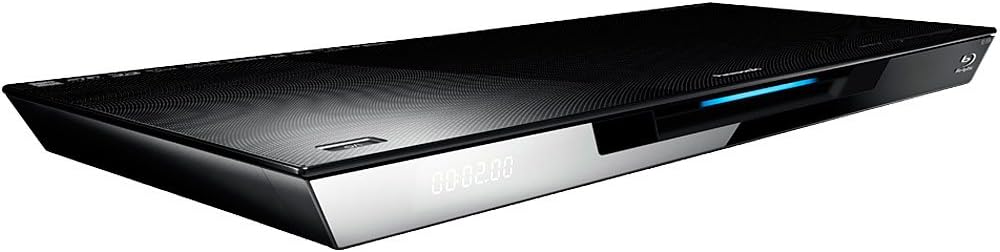
Panasonic DMP-BDT320 Wi-Fi 3D Blu-ray Player

$99.00
Panasonic DMP-BDT320 Wi-Fi 3D Blu-ray Player Price comparison
Panasonic DMP-BDT320 Wi-Fi 3D Blu-ray Player Price History
Panasonic DMP-BDT320 Wi-Fi 3D Blu-ray Player Description
Discover the Panasonic DMP-BDT320 Wi-Fi 3D Blu-ray Player
The Panasonic DMP-BDT320 Wi-Fi 3D Blu-ray Player is designed for those who crave high-quality home entertainment. With its advanced features and seamless wireless connectivity, this Blu-ray player enhances your viewing experience. Whether you’re watching the latest blockbuster or streaming your favorite shows, the DMP-BDT320 integrates flawlessly into any home theater setup.
Key Features and Benefits
- Wi-Fi Connectivity: Enjoy hassle-free streaming from popular services without the need for additional cables. Connect easily to the internet and access a world of entertainment.
- 3D Playback: Experience immersive 3D visuals like never before. The DMP-BDT320 brings movies to life, making them a truly engaging experience.
- High-Quality Audio Formats: With support for Dolby TrueHD, Dolby Digital Plus, and DTS-HD Master Audio, enjoy crystal-clear sound that complements stunning visuals.
- Sleek Design: At just 16.9 x 7.1 x 1.1 inches and weighing only 3.3 pounds, this player is compact yet powerful, fitting seamlessly into your entertainment center.
- Multi-Format Support: Equipped with video encoding capabilities for H.264, VC-1, and MPEG-2, the DMP-BDT320 accommodates a variety of media formats for flexible playback.
- HDMI Connectivity: The single HDMI port ensures easy integration with your existing equipment, providing a straightforward way to enhance your home theater setup.
- Remote Control Included: Effortlessly navigate the player’s features with the included remote, ensuring intuitive control of your media experience.
Price Comparison Across Suppliers
The Panasonic DMP-BDT320 Wi-Fi 3D Blu-ray Player is a popular choice among consumers, and it’s available through various retailers. Prices may vary depending on the platform, but our comparison tool shows you the best options available. On average, you might find the model priced between $120 and $170 across major online stores. By comparing prices on our platform, you can save money while investing in a high-quality Blu-ray player.
Notable Trends from the 6-Month Price History
Our 6-month price history chart reveals some interesting insights. Over the last six months, the price of the Panasonic DMP-BDT320 has remained stable, with peak prices being around $160 during holiday sales. However, prices usually dip in the offseason, allowing savvy shoppers to snag a great deal. This trend reflects the competitive nature of the electronics market, where timing can greatly influence your purchase decision.
Customer Reviews Summary
The Panasonic DMP-BDT320 has received mixed but mostly positive feedback from customers. Many users praise its exceptional video and audio quality, indicating that it truly enhances their movie-watching experience. The 3D playback feature receives accolades for providing immersive visuals that bring films to life. Furthermore, users appreciate the easy-to-navigate interface and Wi-Fi capability that enables seamless streaming.
However, some customers mention drawbacks. A recurring theme in reviews is the need for occasional firmware updates to ensure optimal performance. Additionally, a few users point out that while the player is user-friendly, the remote control could benefit from a more intuitive layout. Despite these concerns, the overall consensus is that the DMP-BDT320 effectively delivers an exceptional viewing experience.
Exploring Unboxing and Review Videos
For those who love a hands-on approach, several YouTube videos offer exciting unboxing experiences and in-depth reviews of the Panasonic DMP-BDT320. These videos provide valuable insights into the product’s setup process, performance features, and overall functionality. Watching these can help you make an informed decision before making a purchase. Check out these reviews to see how the DMP-BDT320 performs in real-world settings and gather tips from fellow users.
Conclusion
In conclusion, the Panasonic DMP-BDT320 Wi-Fi 3D Blu-ray Player is an excellent choice for anyone looking to elevate their home entertainment system. With advanced features, stylish design, and robust performance, it brings movies and music to life. With varying prices across suppliers, be sure to compare options to secure the best deal. Join numerous satisfied customers who have transformed their viewing experience with this incredible Blu-ray player.
Compare prices now and take your home theater experience to the next level!
Panasonic DMP-BDT320 Wi-Fi 3D Blu-ray Player Specification
Specification: Panasonic DMP-BDT320 Wi-Fi 3D Blu-ray Player
|
Panasonic DMP-BDT320 Wi-Fi 3D Blu-ray Player Reviews (3)
3 reviews for Panasonic DMP-BDT320 Wi-Fi 3D Blu-ray Player
Only logged in customers who have purchased this product may leave a review.

Jeff –
Player – This is my first Blu-ray player and I’m very happy with all of its features and picture quality. I have it going through an Onkyo receiver via HDMI. Great DVD upconvert. The player has so many features it takes a while to find them all. I have this player, my receiver, DTV all connected to my network and prefer to go through this player to access pictures on my computer, Netflix, and Pandora, etc. The steps to set it up are fairly easy, even while fighting with the touch pad remote. I’ve tried everything except Skype and will do so once I find a camera that gets better ratings. Regular webcam will not work. I might give the one they recommend a shot since the ability to Skype is one of the main reasons I chose this player, but haven’t yet.
Remote – Total failure. It’s not difficult to figure out, just VERY hard to navigate. Entering user names and passwords is irritating at a minimum, and I’m very good with computers, gadgets, etc. Official Panasonic remote app is not compatible with my android (Rooted HTC EVO). It really hit me when I was about to buy a third party remote app…why would Panasonic make customers do anything they could to avoid using the included remote?? I programmed my Onkyo receiver remote to work with the player and it does everything I want it to do so far. It has a center select button, up, down, left, right, play, stop, pause, FF. Basically, the functions the included remote should have instead of the stupid touch pad.
Outputs – There is only one HDMI and 1 composite. Other people may not need or care, but I’d like another HD output. One to the receiver and one direct to the TV so I can view two HD sources when I split my TV screen.
Gerald –
The picture quality coming from this player is just stunning when playing Blu Ray DVDs.
The up scaling this player provides is the best I have ever seen when I play my older DVDs.
The setup on this player was extremely easy and straight forward. It found & connected to my wireless
router within seconds. After it connected to the internet I updated its firmware. I then went and connected to my Netflix account. The video streaming has been Seamless and flawless every time I have went to Netflix. I have experienced Zero video streaming issues. It has never stopped, paused or required me to reconnect while watching any movie or TV show on Netflix.
The player also looks sleek and sexy just setting there.
—————————————————
Now let me address the remote that the Panasonic DMP-BDT320 comes with. For I’m sure you have read a ton of reviews saying that its remote is nothing short of being a piece of junk.
Well PLEASE TRUST me when I say this. It’s remote is one of the best things about this player. It’s very comfortable in your hand and works beautifully. If you have a touch screen smart phone or a Apple IPad it works the very same way. Just sweep you finger across the area and it responds. On the remote there is a KEYS button that you press to display the commands on the TV screen. That way all you need to do is look at the TV screen and swipe your finger. This is so much easier than trying to see your remote in the dark.
Please do yourself a big favor and please disregard all the negative comments about this players remote not be very user friendly.
I almost didn’t order this player because of those reviews but I am SOOOOOOO glad I didn’t listen to them.
I highly recommend the Panasonic DMP BDT320 Blu Ray Player to everyone.
5 stars from me …..
—————————————————
Update 6/30/12
I have been experiencing Netflix timeouts from time to time after watching several TV shows back to back or watching a long movie. I could not get this to stop and thought it was in the players settings somewhere or it was a player issue.
So I began to do research on this Blu Ray player to see if anyone else was having this Netflix issue. To my pleasant surprise there were several DMP-BDT320 owners experiencing the same issues but what I uncovered was that the problem was not with the player but with my Netflix settings.
Until now. The NetFlix problem is not inside the BDT320. It is in Netflix. Specifically your “Manage Video Quality” settings.
By default it is not set to anything.
Below is how to fix the Netflix timing out issues.
To fix this simply Go to Netflix.com, log into your account, and click on the link in the upper right called “Your Account & Help”. Scroll down to the “Instant Watching” section and click on the link for “Manage Video Quality”.
You will need to choose one of the following options … Good, Better, or Best ( you will probably notice NONE of these options are selected – that is the problem).
Note – it took about two days for the new setting to kick in. So be patient.
No more Netflix timeouts!!!!
Good luck
Jak in Toronto –
I have two Panasonic Bluray DVD players and this latest model confirms my belief that no one makes a better unit than Panasonic, in this price range, with providing excellent 3D, Standard and High Definition picture quality. So good in fact that I have difficulty at times seeing any difference with the Blu-ray Vs. Standard Def. The quality of the unit is first class and the disc is fed into a drive slot at the front,no tray, is easy and efficient in operation. Now the remote control operates with a very, very sensitive touch pad. Which I really do not care for and might very well discourage consumers from purchasing.
I was, after a period of time able to figure it out but decided that my Harmony One Remote made life considerably easier and programmed it to take over, thereby my box full of cast off remotes received another to add to the collection. There is no reject button but I can live with that and use the control on top of the player. Incidentally, Harmony still do not have the programming Data for this unit they do provide sufficient information from previous models to get you up and running with a simple touch of a button. I suspect that there is a brand new Harmony One in the works.
Great Machine.
Remote Control is like something from control panel on Starship Enterprise.