
VEGAS Pro 22 – All-In-One Video Software
 Bestbuy.com
  Indigo.ca
  Videostudiopro.com
  Lenovo.com
  Dell.com
$199.00
VEGAS Pro 22 – All-In-One Video Software Price comparison








- All prices mentioned above are in Canadian dollar.
- This product is available at Bestbuy, Indigo Books & Music, Corel Corporation, Lenovo.com.
- At bestbuy.com you can purchase Individual Software - ResumeMaker Professional Deluxe 20 - Windows [Digital] for only C $41.97 , which is 91% less than the cost in Lenovo.com (C $469.99).
- The lowest price of Lenovo Brother MFC-L3720CDW Digital Colour All-in-One Printer with Copy, Scan and Fax was obtained on October 25, 2026 03:24.
VEGAS Pro 22 – All-In-One Video Software Price History
VEGAS Pro 22 – All-In-One Video Software Description
VEGAS Pro 22 – All-In-One Video Software
Are you ready to take your video editing skills to the next level? Look no further than VEGAS Pro 22. This all-in-one video software is perfect for both beginners and experienced professionals looking to enhance their creativity while ensuring a streamlined editing process. Discover a powerful tool that delivers stunning results and enjoy a superior editing experience that is sure to impress.
Key Features of VEGAS Pro 22
- Advanced Editing Tools: VEGAS Pro 22 offers a suite of advanced editing features designed for ultimate flexibility. With features like multi-cam editing, a customizable user interface, and precise control over timelines, you can edit your videos like a pro.
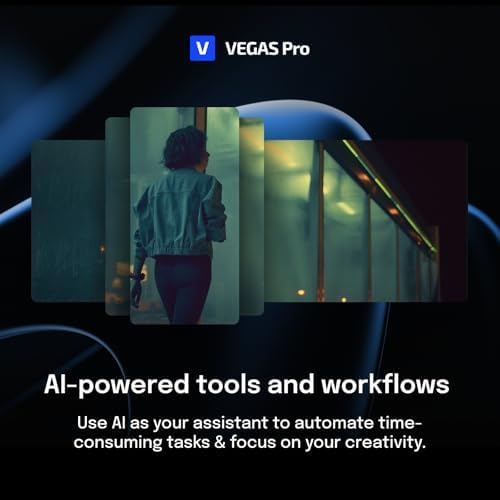
- Innovative AI Capabilities: Experience the power of artificial intelligence as it automates various tasks, from scene detection to color correction. This saves time and enhances your workflow efficiency.
- High-Quality Video Output: VEGAS Pro 22 supports 4K and HDR content, allowing you to create high-quality videos that meet professional standards. Share your work with confidence across all platforms.
- Robust Audio Editing Features: The software includes advanced audio editing tools, enabling you to synchronize, mix, and master your audio tracks with precision.
- Seamless Integration: Easily integrate VEGAS Pro 22 with popular media formats and other software applications. This enhances your project pipeline without any interruptions.
Comparative Pricing Insights
When it comes to pricing, VEGAS Pro 22 offers competitive options across various suppliers. By visiting our price comparison section, you can see fluctuations in real-time, ensuring that you get the best deal possible. Whether you are looking at Amazon or specialized software retailers, you’ll find options that fit your budget.
Six-Month Price History Trend
Our detailed six-month price history chart shows that the price of VEGAS Pro 22 has remained relatively stable. This indicates strong demand for the software, reflecting its popularity among content creators. While occasional discounts occur, the value for the quality provided is consistently maintained.
Customer Reviews: What Users Are Saying
Reviews for VEGAS Pro 22 are overwhelmingly positive, with many users praising its intuitive interface and powerful features. Customers appreciate the software’s speed and efficiency, especially when handling complex projects. Notable strengths include:
- User-friendly navigation that reduces the learning curve for beginners.
- Incredible rendering speeds that minimize waiting time.
- Extensive online resources and community support that help users troubleshoot issues.
However, some users have pointed out a few drawbacks. A few reviews mention:
- Initial setup can be complicated for novice editors.
- Some advanced features may require additional learning and practice.
These insights reflect that while VEGAS Pro 22 is a robust option for video editing, there may be a slight learning curve involved.
Unboxing and Review Videos
For those interested in getting a real sense of this powerful software, we recommend checking out various YouTube review and unboxing videos. These resources demonstrate the software’s features in action, providing potential users with practical insights and workflows that can enhance your editing capabilities.
Why Choose VEGAS Pro 22?
If you’re an aspiring video editor or an experienced content creator, VEGAS Pro 22 is an essential tool in your arsenal. Its blend of advanced features, user-friendly design, and competitive pricing make it a top choice for individuals and businesses alike. Enjoy the benefits of powerful video editing software that seamlessly integrates into your creative process.
Don’t miss out on the advantages that come with successful video editing. VEGAS Pro 22 helps transform your video projects into stunning masterpieces.
Compare prices now!
VEGAS Pro 22 – All-In-One Video Software Specification
Specification: VEGAS Pro 22 – All-In-One Video Software
|
VEGAS Pro 22 – All-In-One Video Software Reviews (13)
13 reviews for VEGAS Pro 22 – All-In-One Video Software
Only logged in customers who have purchased this product may leave a review.

![MAGIX Movie Studio 13 [Download]](https://discompare.ca/wp-content/uploads/thumbs_dir/movie-studio-13-download-qvjji1y1yu4huoia6rnvplx1hlalfkqwud8u24d3pc.jpg)

Rf1comp –
I have used several software to edit videos, with and without audio. This software is one of the best that I have used in the past few years.
I like the option to select resolution ratio, which allow you to select format size in which you plan to output. Another great aspect is it’s playback quality with smooth motion at full resolution. While playing around with the software I noticed several new features that will help improve my editing. I look forward to using this software more and more as time goes on. Highly recommended.
STEFANIE L. –
Having tested Vegas Pro 22, I’m impressed by its blend of power and user-friendliness. This latest version enhances the editing experience with some standout upgrades.
Workflow and user Interface
The revamped interface is sleek and intuitive. Customizable workspaces and an updated look make navigation smoother. Transitioning from older versions is seamless and the new design boosts efficiency.
Performance and Stability
Vegas Pro 22 delivers on performance with faster rendering and smoother playback, thanks to improved multi-core and GPU support. Stability is also better, with minimal crashes during my sessions.
Video Editing Features
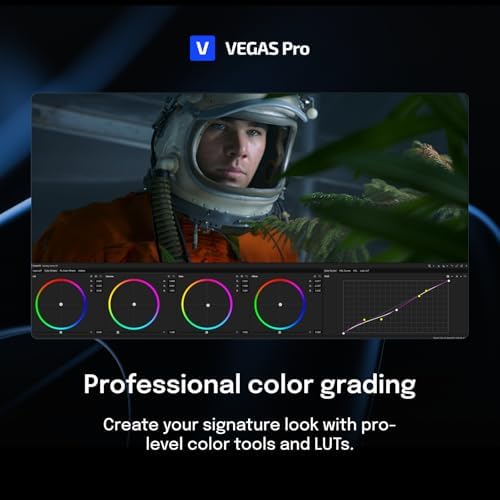
The software excels in handling high-resolution formats like 4K and HDR. New tools for motion tracking and color grading are impressive, and AI-driven effects simplify complex edits.
Audio Editing and Mixing
Audio features are robust, with effective multi-track mixing, real-time effects, and advanced noise reduction. The improved audio engine and VST3 plugin support offer great control over sound quality.
New Features and Enhancements
AI-based scene detection and object removal, along with improved collaborative editing, enhance productivity. These updates make both solo and team projects more efficient.
The software may be overwhelming for beginners with its feature-rich features, however, extensive tutorials and support resources help ease the learning process.
My conclusion is that Vegas Pro 22 is capable of combining advanced features with a user-friendly interface at the same time, making it a strong choice for both professionals and newcomers
Mr. Z –
VEGAS Pro 22 bietet neben den neuen Funktionen KI Auto Reframe und Beat Detection viele weitere Neuerungen. Dieser Testbericht gibt einen Überblick über die neuen Features und die günstigsten Preise.
Die Highlights der neuen Version 22 von VEGAS Pro für Windows, entwickelt von Magix, umfassen das KI Auto Reframe zur automatischen Anpassung des Seitenverhältnisses, Beat Detection für präzise Schnitte im Takt und KI-basierte Effekte für Bildskalierung, Entnebeln, Glätten, Schärfen und mehr. Zudem hat Magix den Startdialog der Software erneut optimiert und die Produktauswahl vereinfacht: Mit dem Wegfall von VEGAS Pro Post wird die Kaufentscheidung erleichtert, da Kunden, die sich für VEGAS Pro 22 Suite entscheiden, zusätzliche Software wie ACID Pro 11 und SOUND FORGE Pro erhalten, die bisher nur in VEGAS Pro Post enthalten war. Käufer einer früheren Version von VEGAS Pro Post können weiterhin VEGAS Effects und VEGAS Image nutzen, wenn sie auf die günstigere VEGAS Pro 22 Suite upgraden. Auch mit VEGAS Pro 22 Edit sind professionelle Videoschnittmöglichkeiten zu einem attraktiven Preis verfügbar.
Der große Funktionsumfang mit intelligenten Werkzeugen und Funktionen sowie KI-basierten Features ist selbst in der günstigsten Variante, VEGAS Pro Edit, beeindruckend. Hervorzuheben sind Funktionen wie Smart Masken, Z-Depth für Texte in verschiedenen Tiefenebenen und die äußerst nützlichen Einstellungsspuren und -events, die eine flexible, komfortable und zeitsparende Zuordnung von Effekten ermöglichen.
**Zusammenfassung der neuen Features von VEGAS Pro 22:**
– Umfangreiche Videobearbeitung mit Profi-Werkzeugen für Audio und Compositing
– Mehrspurige Audioaufnahmen und 3D-Motion-Tracking
– KI-Funktionen wie Auto Reframe, Bildskalierung, Entnebeln, Glätten und Schärfen
– Optimierte Funktionen zur Bearbeitung von Titeln und Texten, verbessertes MultiCam-Audio-Sync und neue Menüoptionen
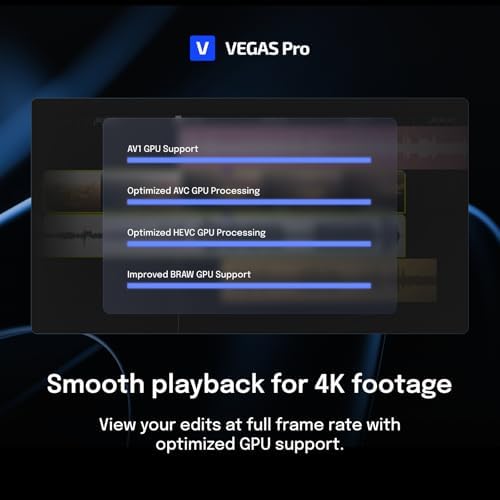
– Verbesserte Performance durch optimierten GPU-Support für HEVC, AVC, AV1 und BRAW
Weitere Funktionen wie Text-zu-Sprache, Sprache-zu-Text, Cloudspeicher und kommerziell nutzbare Inhalte sind auch in VEGAS Pro 22 enthalten und wurden im Vergleich zur Vorgängerversion verbessert. Ein Abonnement bleibt attraktiv, um zusätzlichen Content und Speicherplatz zu nutzen.
**Änderungen in den Pro-Versionen und weggefallene Features:**
Mit dem Wegfall von VEGAS Pro Post sind einige Funktionen, wie die Bildbearbeitung VEGAS Image und VEGAS Effects, nicht mehr direkt in VEGAS Pro 22 Suite enthalten. Kunden, die VEGAS Pro Post besitzen, können durch ein günstiges Upgrade diese Programme weiterhin nutzen. Das Boris FX Primatte Studio für realistische Chroma-Key-Szenen ist ebenfalls nicht mehr enthalten, kann jedoch separat erworben werden.
Dafür bietet die VEGAS Pro 22 Suite jetzt die vollwertigen Versionen der Musiksoftware ACID Pro 11 und des Audioeditors SOUND FORGE Pro 18 sowie zusätzliche Inhalte wie Mocha VEGAS für Motion Tracking und Stabilisierung.
**KI Auto Reframe für automatische Anpassung an Seitenverhältnisse:**
Dank KI passt Auto Reframe ein Video automatisch an verschiedene Seitenverhältnisse an, indem es den Fokus auf das wichtigste Objekt zentriert. Diese Funktion ist besonders nützlich, um Breitbildvideos für soziale Medien im quadratischen Format zu nutzen, ohne dass das Hauptmotiv aus dem Blick gerät.
**Beat Detection in VEGAS Pro 22:**
Die Beat Detection analysiert Musik und markiert wichtige Beats, sodass Videoabschnitte exakt im Takt angepasst werden können. Diese Funktion ist besonders hilfreich für die präzise Synchronisation von Video und Musik.
**Systemvoraussetzungen für VEGAS Pro 22:**
VEGAS Pro 22 läuft unter Windows 10 und 11 und benötigt für einige Funktionen eine Internetverbindung. Die empfohlene Hardwareausstattung variiert je nach Anforderungen, von HD bis zu 4K und für KI-Funktionen.
**Unterstützte Dateiformate:**
VEGAS Pro 22 unterstützt zahlreiche Video-, Audio- und Bildformate für den Import und Export, darunter Apple ProRes, HEVC/H.265, AVC/H.264, MP4 und viele weitere.
**Fazit:**
VEGAS Pro 22 erweitert das Angebot an KI-Funktionen und bietet viele Neuerungen, die die Bearbeitung von Videos einfacher und effizienter machen. Dank der Vielzahl an verfügbaren Werkzeugen und Effekten ist die Software sowohl für Einsteiger als auch für professionelle Anwender geeignet.
Customer Review –
So I’m ditching my previous major from Journalism and Mass communications for the world of film. And let me just tell you, this software has truly helped me get my feet wet before I’m required to shell out the big bucks for the fancier software my film classes will require. It’s surprisingly easy to use and understand. The interface is clean and user friendly, even for a newbie like me. I was cutting and splicing edits like a pro in no time at all. Some of the automated features are helpful, like taking out the guesswork and certain tasks, giving me more time to focus on the creative stuff. Especially the voiceover templates. How cool? I have a friend that I can help make book trailers with innovative voice-over work.
This Vegas software runs smoothly and effortlessly on my laptop, surprisingly because of all the video and audio tracks that may make you think is using a lot of RAM. I’m very impressed with this software so far, and I would recommend this to anybody getting started.
Chi Ly –
VEGAS Pro 22 is an impressive all-in-one video editing software that caters to both beginners and professionals. The user-friendly interface and seamless integration of video and audio editing tools make it easy to dive right into your projects. The timeline is intuitive, and the variety of effects, filters, and color grading options are always at your fingertips, ensuring a smooth creative process. The software’s ability to handle post-production tasks efficiently is a significant plus, making it a reliable choice for high-quality video creation.
One of the standout features of VEGAS Pro 22 is its AI-powered tools. These features, such as automated masking, voiceovers, and text-based editing, significantly enhance productivity and streamline the editing process. The flexibility to expand its functionality with thousands of plug-ins through OFX and VST interfaces is another highlight, allowing users to tailor the software to their specific needs. While it requires a robust system to run smoothly, the overall performance and capabilities of VEGAS Pro 22 make it a valuable investment for anyone serious about video editing.
NuiG –
I’ve been using Vegas Pro 22 for a few weeks now on a windows 10 system. There’s been a bit of a learning curve for me but the software is pretty good at streamlining the video editing. So far no crashes and it seems to work pretty quickly.
Techccessory –
Got a digital code and it works just as advertised. It’s non transferable to different devices even under the same email/user. So make sure you keep it on a device that you plan on owning and using for a long time
jrb –
Um meine Video-Bearbeitung zu optimieren, hatte ich mich für das neue VEGAS Pro 22 Programm entschieden. Bisher hatte ich mit verschiedenen von MAGIX und anderen Herstellern gearbeitet. Doch ohne KI Unterstützung, die gab es damals noch nicht.
Vegas Pro hatte ich dann auf meinem Windows 10 Rechner (2018) installiert, aber weil die Systemanforderungen vom Prozessor und Grafikkarte nicht ausreichten, lief die Software darauf etwas eingeschränkt und nicht so wie erwartet. Daraufhin installierte ich VEGAS auf meinem Windows 11 Mini PC und es funktionierte einwandfrei, in vollem Umfang bis zu 4K. Eine kleine Einarbeitungszeit sollte man sich aber gönnen, um die vielen Möglichkeiten gezielt einsetzen zu können.
Die Bedienung der Oberfläche ist übersichtlich angeordnet und praktisch für Neueinsteiger und auch für den Profi geeignet. Das automatische KI-Reframing möchte ich nicht mehr missen, denn allein die Korrektur von Hoch und Querformat finde ich ideal. Das Programm ist mit vielen nützlichen Werkzeugen und Effekten ausgestattet, was der Kreativität unbegrenzte Möglichkeiten bietet. Es werden eine Vielzahl von Audio, Video und Bildformate unterstützt. Aus meiner Sicht alle gängigen Codecs, denn ich hatte noch nichts dabei, was ich umwandeln oder separat bearbeiten musste. Das Color-Grading ist gute Ergänzung, um einzelne Sequenzen passgenau zu bearbeiten.
Alles in allem ein gutes Komplettpaket zu einem akzeptablen Preis- Leistungsverhältnis. Denn es gibt Programme, die etwas mehr Möglichkeiten bieten und das sogar kostenlos. Aber im Großen und Ganzen bin ich damit sehr zufrieden. Schade, dass die Nutzung für Text to Speech, Speech to Text, Clud-Speicher und Stock Fototage auf ein Jahr begrenzt ist und danach ungenutzte Kontingente verfallen. Deshalb gibt’s ein Stern Abzug!
Ree Méndez –
I’ve been using VEGAS Pro 22 for a few months, and it has truly elevated my video editing workflow. This software is packed with powerful tools for both video and audio editing, making it a great all-in-one solution for post-production.
Key Features:
The timeline-based editing is smooth and intuitive, perfect for both beginners and professionals. I love how easily it handles 4K footage without lag, and the wide variety of effects and transitions makes editing creative and fun. The built-in audio tools are equally impressive, allowing me to fine-tune sound quality without needing external software.
Performance:
It runs efficiently on my Windows 10 PC, even with multiple tracks and layers. The rendering speeds are fast, and the software has been stable with no crashes, which is a huge plus during longer editing sessions.
User Interface:
The interface is user-friendly, with customizable layouts that make it easy to focus on specific tasks. Whether I’m cutting a simple video or working on a complex project, VEGAS Pro 22 provides all the tools I need, and the learning curve isn’t steep.
Final Thoughts:
If you’re looking for an all-in-one solution for video and audio editing on Windows 10/11, VEGAS Pro 22 is a great investment. It offers professional-level features with smooth performance, making it ideal for both casual creators and experienced editors.
Elfie –
Ich habe seit Jahren mit Magix Produkten gearbeitet. Nicht professionell, sondern für Youtube Videos und Urlaubsvideos etc. Früher hatte ich mit Magix Video deluxe angefangen. Bin dann zu Video Pro X gewechselt und hatte auch Vegas Pro 16 gekauft aber wieder deinstalliert.
Das Video Schnittprogramm kommt in der Magix typischen schwarz grauen Faltkarte. Das Siegel war bei mir jedoch schon geöffnet, aber die Software noch nicht lizenziert. Glück gehabt. Ob es nun beim Verpacken passierte oder beim Versand kann ich nicht sagen.
Die Installation verläuft Menü geführt und ist fix erledigt. Registrieren und noch ein paar Updates einspielen und schon kann es losgehen. Wie auch bei Vegas Pro 16 finde ich die UI extrem überfordernd und unintuitiv. Mit Video Pro X geht das alles viel einfacher, ohne Stunden lang das Handbuch oder Videos durchsehen zu müssen. Natürlich nur, sofern man sich mit dem Schnitt und ein paar einfachen Überblendungen zufriedengibt. Will man mehr, muss man auch in Video Pro X einiges googeln und ausprobieren.
Wenn man sich jedoch in Vegas Pro eingearbeitet hat ist gerade das Colorgrading echt super. Man hat hier doch viel mehr Möglichkeiten seine Werke ins rechte Bild zu setzen, als mit dem “Kleinen Bruder”.
Die Vorschau und das Rendering gehen mit meiner RTX 4070 TI problemlos und letzteres ein paar Minuten schneller als bei Video Pro X. Vielleicht sind die Effekte besser optimiert. Ich hatte ein 60 Minunten Video mit dem gleichen schnitt und den gleichen Effekten. Trotzdem war das Rendering 5-8Minuten schneller. Das ist nun kein Kaufgrund aber ich wollte es mal erwähnen.
Die Zusatzfunktionen wie Text to Speech oder Cloudspeicher nutze ich nicht. Beat Detection ist jedoch genial. Das hatte ich bei Final Cut auch gesehen. Mein Vetter ist Musiker und hat damit sein Musik Video erstellt und meinte, dass Final Cut die Schnitte mit den Videospuren selbst gesetzt hat. Es wurden mehrere Videos von verschiedenen Winkel eingelesen. Das macht Vegas Pro nun auch. 🙂
LS –
This software for video and audio is easy to use. I do some content and this software is much easier to work with compared to editing videos and audio using my phone. Much more powerful and effective with lots of features. Would highly recommend
Customer Review –
I’ve been using Vegas Pro 22 for a few weeks now, and I’m pretty impressed by it. It’s a great tool but it does have a bit of a learning curve. I like that it has a lot of features, but it can be a bit overwhelming at first. However, once you get the hang of it, you can do some pretty cool things with it. I’m still learning new things all the time, and I’m glad I took the time to start to learn how to use it. I’m happy with Vegas Pro 22 and I would recommend it to anyone who is looking for some real video editing software.
NYCTechGeek –
MAGIX VEGAS 22 PRO hat meine Erwartungen nach meinen ersten Projektbearbeitungen mehr als erfüllt. Wie im Titel gesagt, bin ich mit MAGIX groß geworden und seit meiner Jugend arbeite ich mit den unterschiedlichsten MAGIX-Tools.
VEGAS 22 PRO und sich als mein “go to” Tool für die Videobearbeitung erwiesen. Die Software ermöglicht eine nahtlose Bearbeitung von Video und Audio sowie eine umfassende Nachbearbeitung, die sowohl für Anfänger als auch für Profis geeignet ist.
Benutzerfreundlichkeit und Effizienz:
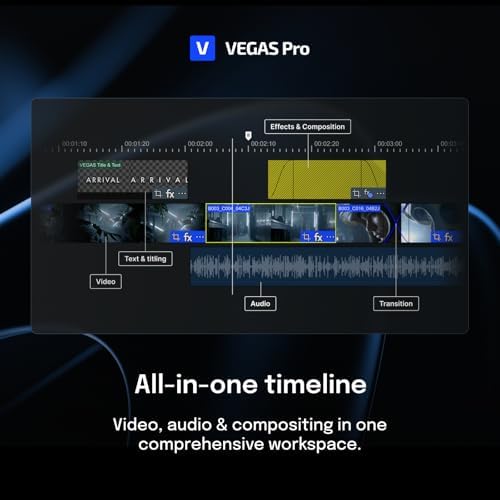
Die All-in-One-Timeline ist äußerst benutzerfreundlich und ermöglicht es, im kreativen Flow zu bleiben. Alle wichtigen Tools für Video- und Audiobearbeitung, Color Grading, Effekte und Filter sowie Compositing sind übersichtlich angeordnet und immer griffbereit. Dies spart nicht nur Zeit, sondern erhöht auch die Effizienz bei der Bearbeitung.
KI-gestützte Funktionen: Besonders beeindruckend sind die KI-gestützten Funktionen. Die Erstellung von Masken, Voiceover und Untertiteln geht unglaublich schnell und einfach von der Hand. Das Text-based Editing ist super hilfreich und ermöglicht es, Interviews so einfach wie ein Textdokument zu bearbeiten. Diese Funktionen machen die Bearbeitung nicht nur schneller, sondern auch präziser. Das Framing gefällt mir auch sehr gut mit anhand der KI Features.
Erweiterbarkeit und Anpassungsfähigkeit: Dank der OFX- und VST-Schnittstellen kann der Funktionsumfang von VEGAS Pro mit tausenden Plug-ins erweitert werden. Dies ermöglicht eine modulare Anpassung an individuelle Workflows und Bedürfnisse, was die Software extrem flexibel und anpassungsfähig macht.
Leistungsstarkes Toolkit: VEGAS 22 PRO bietet ein umfassendes Toolkit, das alle Aspekte der Videobearbeitung abdeckt. Von der grundlegenden Bearbeitung bis hin zu fortgeschrittenen Effekten und Compositing – alles ist möglich. Die Software ist stabil und leistungsstark, was sie zu einer zuverlässigen Wahl für jede Art von Videoprojekt macht.
Fazit: Insgesamt bietet MAGIX VEGAS 22 PRO eine sehr gut gelungene Kombination aus Benutzerfreundlichkeit, leistungsstarken Funktionen und Flexibilität. Die Software ist eine sehr gute Ergänzung für meine Videobearbeitung hat zwei andere Tools ersetzt. Ich bin top-zufrieden.