
Tenda Nova Mesh WiFi System MW6 – AC1200
 Dell.com
 Lenovo.com
 Bestbuy.com
 Amazon.ca
 Tsc.ca
 Primecables.ca

$73.99
Tenda Nova Mesh WiFi System MW6 – AC1200 Price comparison















- All prices mentioned above are in Canadian dollar.
- This product is available at Bestbuy, Dell Canada - Home & Small Business, Lenovo.com, 123Ink.ca, Amazon.ca, Today's Shopping Choice.
- At bestbuy.com you can purchase Mount Genie - Round Plug Outlet Mount for Google WiFi AC1200 (3-Pack) - White for only C $35.63 , which is 92% less than the cost in 123Ink.ca (C $429.99).
- The lowest price of Whole Home Mesh WiFi System. Wi-Fi 6 Speed & Coverage 3-PACK was obtained on November 14, 2026 16:10.
Tenda Nova Mesh WiFi System MW6 – AC1200 Price History
Tenda Nova Mesh WiFi System MW6 – AC1200 Description
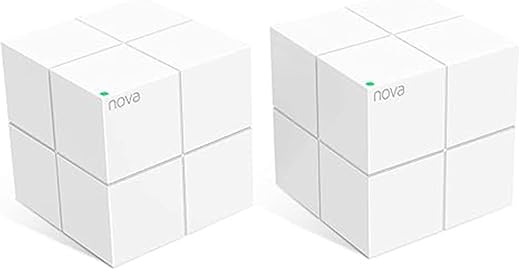
Tenda Nova Mesh WiFi System MW6 – AC1200: Seamless Connectivity for Your Home
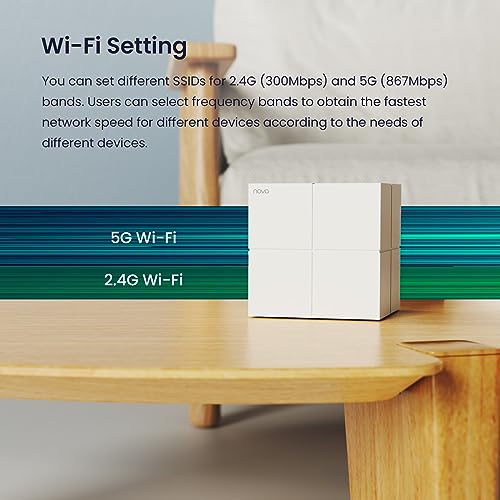
Experience unparalleled wireless performance with the Tenda Nova Mesh WiFi System MW6 – AC1200. This robust mesh WiFi solution offers reliable coverage and high-speed connectivity, ideal for streaming, gaming, and connecting multiple devices across your home or office. Discover how this system enhances your internet experience as we explore its key features, price comparisons, customer reviews, and more.
Key Features and Benefits of Tenda Nova MW6
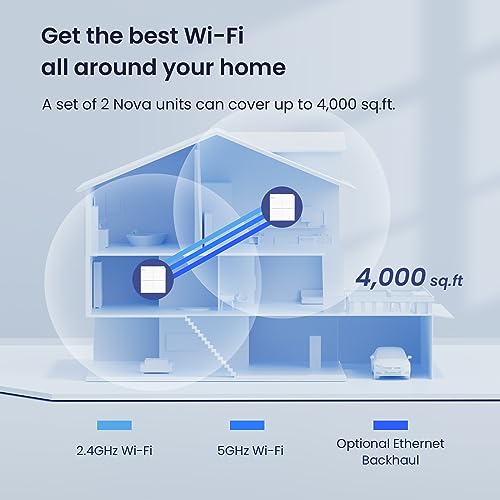
- Dual-Band Connectivity: With a data transfer rate of 1200 Mbps and support for 802.11ac, the Tenda Nova MW6 ensures stable connections on both 2.4GHz and 5GHz bands, optimizing speed and performance for various applications.
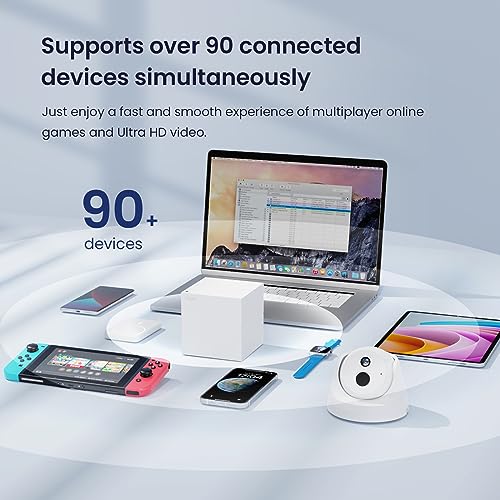
- Multiple Devices Support: This mesh system supports connections for smartphones, tablets, smart televisions, gaming consoles, and more, allowing multiple users to enjoy seamless browsing and streaming without interruptions.
- Advanced Security Protocol: Featuring WPA2-PSK security, your network remains protected from unauthorized access, ensuring a safe environment for all your connected devices.
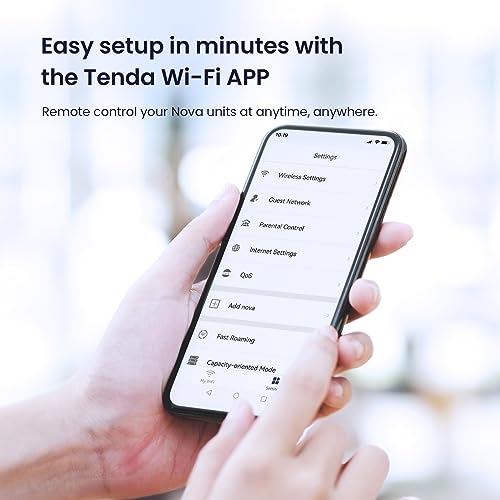
- Quick and Easy Setup: Included in the package are 3 power adapters, a quick install guide, and a gigabit Ethernet cable, making setup a breeze even for non-tech-savvy users.
- QoS Functionality: Quality of Service (QoS) allows you to prioritize bandwidth for specific applications, ensuring that gaming or streaming takes precedence when multiple devices are connected.
- Compact Design: Each unit measures 3.93 inches, making it stylish and easy to place anywhere in your home without taking up excessive space.
Price Comparison Across Suppliers
The Tenda Nova Mesh WiFi System MW6 – AC1200 offers competitive pricing across various online retailers. Typically, prices range from $99.99 to $129.99, depending on promotional discounts and availability. By comparing prices on our platform, you can find the best deal and ensure you get the most value for your investment. Use our price comparison tool to discover which retailer currently has the lowest offering.
6-Month Price History Insights
Our detailed 6-month price history chart shows a consistent price trend for the Tenda Nova MW6. Over the last months, prices have occasionally dipped during sales events, making it an opportune time for buyers to act when they see drops below $100. Monitoring these trends helps shoppers make informed purchasing decisions.
Summary of Customer Reviews
Customers rave about the Tenda Nova MW6 for its robust performance and easy installation process. The dual-band feature is frequently highlighted, as many users appreciate seamless transitions between bands without losing connection speeds. Users also commend its security features, feeling confident in their network’s protection at home. Positive reviews often comment on the enhanced streaming experiences and solid connectivity even in larger homes.
However, some users have mentioned occasional connectivity issues with more complex setups or with certain devices. While these instances appear to be less frequent, it’s crucial to be aware of them before deciding. Overall, the consensus leans heavily toward satisfaction, especially with the device’s range and speed.
Engage with Unboxing and Review Videos
To get a deeper understanding of the Tenda Nova MW6, consider watching unboxing and review videos available on platforms like YouTube. These visual insights provide real-world usage scenarios and tips for maximizing your home network’s performance. Many reviewers showcase the ease of setup and share troubleshooting tips, making it beneficial for prospective buyers.
Why Choose Tenda Nova Mesh WiFi System MW6?
With its user-friendly setup, strong performance, and enhanced security features, the Tenda Nova Mesh WiFi System MW6 – AC1200 is an ideal choice for those looking to improve their home connectivity. Whether you are a casual browser, a gamer, or a binge-watching enthusiast, this mesh WiFi system delivers the speed and coverage you need to navigate today’s digital landscape effectively.
Don’t settle for poor connectivity. With Tenda, you are investing in a reliable and efficient internet experience. Compare prices now!
Tenda Nova Mesh WiFi System MW6 – AC1200 Specification
Specification: Tenda Nova Mesh WiFi System MW6 – AC1200
|
Tenda Nova Mesh WiFi System MW6 – AC1200 Reviews (10)
10 reviews for Tenda Nova Mesh WiFi System MW6 – AC1200
Only logged in customers who have purchased this product may leave a review.



Gorgeous –
First off, setup was very easy. I have setup several systems in the past and this setup was no problem. I love the coverage! I will admit I bought the 3 device bundle and did need to purchase 2 more devices in order to get a more steady signal. 5 devices are more than enough to cover a 2 story 5 bedroom home. We do a lot of console online game play and we found that, though the wireless signal was good, we had better results when we connected the console directly into the mesh device. This was easy to do because the cubes can be placed any place there is an outlet. Now, I’ve used the Tenda app with their routers and I have to say the app design for this mesh system seems a bit incomplete. You can still see every device attached to your network and set restrictions if you necessary. I did have some issues when setting up my video doorbell, but with some quick research I as able to get it done.
Xial –
The setup for the two cube-shaped mesh routers in the box was disturbingly easy. Having set up a number of routers over the last decade or so, I’m used to needing to do a lot of work to get things up and running, and having something instantly and insistently fail.
I was able to, in the span of ten minutes, unbox one cube, shut down my existing modem and router combo, swap out the router for this little cube, install the app on a phone since that’s how they want you to set it up, and power up everything.
The in-app setup was almost too easy, as I had the network named the way I wanted, with the password we needed, all with minimal, guided effort. Getting the second cube set up 30 feet and one thick wall away was very, very easy. All that was needed was positioning the cube, and getting it power. Beyond that, it paired itself, and had a good, solid connection inside of two minutes.
I spent five minutes afterward, cursing and complaining that it was too easy to set up.
There are a number of out-of-box quirks that I’ve observed:
1. There is no web-based user interface AT ALL.
Yes, for those of you who like to manage your routers from the comfort of your desktop browser, this is well and truly not available.
It forces you to rely on your Android or iOS bearing cellphone or tablet to manage connections and see who’s connected, what IP address they have in the network, and so on. For those of us who still use Windows Phone or Windows Mobile, we’re out of luck.
2. There is no IPv6 support! This is very disappointing, given that this is hardware that supports 802.11ac, the current standard for wireless connections, made long after it’s been known that IPv4 is facing depletion.
It’s an annoyance, but NAT is a thing that’s been going on for a while. I’ll deal with it, especially since it’s possible for a future firmware update to actually add in IPv6 support.
3. The default IP range is strange, but there are a couple of other choices in the app.
4. There’s no option to set a dedicated IP for hardware that connects to the network.
This will make printing a small headache, as we have one laser printer which would fare best with a static IP.
The Tenda app is still useful, as it does help you to visually identify what is connected to your network, including the brand, operating system, or given hostname of most devices. I could identify my desktop PC immediately, along with the smart TV, my tablet, and my cellphone. As others came online, I could identify them, from the lonely Amazon Echo Dot upstairs to an HTC cellphone, and a laptop. There are handy dots running down the left side of the device page with brand logos, and info on whether a device is using a 2.4 GHz, 5 GHz, or wired connection in the case of the printer.
The connection to the router will attempt to auto-negotiate the fastest options first, so wired devices that can also be plugged in will go to the wired connection first. Wireless devices will attempt to latch on to the 5 GHz connection first, and only if that fails does it move down to the 2.4 GHz connection. It will start with Wireless-AC first, and then negotiates down to Wireless-N. It may go further, but I lack devices to test that far down the spectrum at the moment.
For those who need wired connections, each cube has ONE, repeat ONE Ethernet port on it for your use. I’ve not tested whether it will let you use a switch with that port to multiplex that out.
On wireless connections, though, I’ve not had a connection this strong since moving into this house, even with a traditional repeater setup. I’m pulling 150-160 Mbps down from our ISP according to a casual SpeedTest run, which is just under our modem’s speed cap, from the far end of our house, and it is beautiful.
For comparison, prior to this installation, I would pull 30-40 Mbps from the same computer.
The short takeaway from this is simple:
If you need a mesh router system that is simple, has no bells and whistles, and is most importantly EASY to set up, Tenda has a nice piece of kit here for an easy price.
If you need additional bells and whistles, and deeper configuration, you may need to look at more traditional solutions, as it is not available in this hardware and software config.
Nick –
So I bought two 2-packs because I am an idiot who thought that my parents would need more than two in a 2 story 3100 sqft home. Nnoope. With just two they have 5 bars throughout the house. And 3 bars at their friends home two doors over.
Setup was very easy and straight forward; the last time I set up their main router and two access points it quite a hassle getting them all to sync, but with these I put the second cube up, prepared myself for having to do some configurations and it had automatically set itself up before I even opened the app.
Now the negatives for me are mostly the missing static ports, DMZ creation, and no web based interface. At my home I use these fairly often as I have game servers that I run, but if you don’t use those, like my parents, then this shouldn’t even be a blip in your decision. Especially because they seem to do regular firmware updates so who knows what the future holds.
If I didn’t care about those things I would highly recommend these no-hassle, mega-range, attractive to look at, and inexpensive mesh router network.
Fi –
The set up was easy once I reset the first box (pin hole reset button underneath that I used the post of an earring to do). The app made it really easy to set up my main network and a guest network. I have the main unit set in my bedroom by the window (due to previous owners, this is where comcast comes into my house) and the secondary set in the garage near the side window so that they are in direct view of each other (needs to be placed up high and if possible, in direct view of the other for the best signal to communicate between the two) . My whole lot is about 6000 sq ft and I have an excellent signal from every corner. My elderly neighbor only uses a smart phone so I put him on my guest network. His property is of similar size, still gets great signal all over his home. On my main network, I have several gaming systems, laptops, smartphones, Google mini’s & chromecasts, smart speakers, ect. all of which will run simultaneously with no issues both inside and outside my home. An amazing upgrade from the rental equipment from comcast that consistantly would slow down my games or streaming if too much was running on the network. Best purchase I’ve made for my house.
Lília Braga Machado –
Eu já tinha esse roteador há 1ano e meio, pq realmente não dá problema e o sinal conseguiu atingir a maior parte da casa. Só que minha casa tem muitas paredes, é grande pra cima e foram colocadas câmeras ao lado de fora que precisavam de um sinal mais forte, ai acrescentei mais dois pontos e agora não tem canto que não pegue muito bem a internet.
Sobre o vendedor: excelente! Era pra chegar entre 29/01/24 e 31/01/24, mas chegou hoje 20/01/24, ou seja, muito antes. Fora isso veio lacrado, até coloquei o plástico que lavrava na foto, vem com selo da Anatel e tá funcionando perfeitamente bem. Pq tô falando tudo isso?! Pq fui comprar esse Tenda em outro site de compras, com outro vendedor, no qual a propaganda dizia que era roteador TENDA NOVA, mas veio falsificado, sem selo da Anatel e o aplicativo não reconhecia como novo ponto Tenda. Consegui devolver lá, mas é uma situação chata. Então, faço questão de falar que esse vendedor aqui na Amazon presta o serviço que promete, de qualidade, vale a pena comprar aqui. E o preço aqui também foi melhor!
Lília Braga Machado –
L’ensemble vaut son prix, ce n’est pas donné, cependant c’est super efficace et mon réseau wifi est bien plus stable sur tenda que sur la box. étonnant. Très pratique quand on vit dans une vieille maison qui ne laisse pas toujours passer le signal.
plantegenet –
Die Tenda Nova MW6 ist zweifellos eine herausragende Lösung für alle, die mit einem schwachen WLAN-Signal in ihrer Wohnung zu kämpfen haben. Nachdem ich dieses Mesh-System installiert habe, bin ich äußerst zufrieden mit seiner Leistung und möchte eine Bewertung von 5 von 5 Sternen vergeben.
Die Einrichtung des Tenda Nova MW6 war denkbar einfach. Das System besteht aus mehreren Mesh-Einheiten, die einfach an verschiedenen Stellen in der Wohnung platziert werden. Durch die intelligente Verbindung und Kommunikation zwischen den Geräten wird ein nahtloses WLAN-Netzwerk aufgebaut. Selbst für technisch weniger versierte Benutzer ist die Einrichtung ein Kinderspiel.
Was mich besonders beeindruckt hat, ist die beeindruckende WLAN-Abdeckung des Tenda Nova MW6. Trotz meiner Wohnung mit dicken Wänden von 55qm Fläche konnte ich eine durchgehende Verbindung mit 3/3 Balken in der gesamten Wohnung feststellen. Sowohl in den entferntesten Ecken als auch im oberen Stockwerk bleibt die Signalstärke stabil und zuverlässig.
Die Geschwindigkeit des WLAN-Netzwerks ist ebenfalls bemerkenswert. Ich konnte problemlos HD-Videos streamen, Online-Spiele spielen und mehrere Geräte gleichzeitig verbinden, ohne Verzögerungen oder Verbindungsabbrüche zu erleben. Das Tenda Nova MW6 bietet eine zuverlässige und stabile Verbindung, die meinen Anforderungen in vollem Umfang gerecht wird.
Darüber hinaus verfügt das Tenda Nova MW6 über eine benutzerfreundliche App, mit der ich mein Netzwerk problemlos verwalten und Einstellungen anpassen kann. Ich kann beispielsweise Gastzugänge einrichten, Gerätepriorisierung festlegen und die Bandbreite verwalten. Diese zusätzlichen Funktionen tragen dazu bei, dass das Tenda Nova MW6 zu einer umfassenden und dennoch benutzerfreundlichen Lösung wird.
Alles in allem kann ich das Tenda Nova MW6 Mesh-System uneingeschränkt empfehlen. Es bietet eine einfache Einrichtung, eine bemerkenswerte WLAN-Abdeckung und eine zuverlässige Leistung in einer Wohnung mit dicken Wänden. Mit einer Bewertung von 5 von 5 Sternen ist das Tenda Nova MW6 definitiv eine erstklassige Wahl, um WLAN-Probleme zu lösen und ein zuverlässiges Netzwerk zu gewährleisten.
Tim –
Tenda MW6’yı sorsanız, tek kelimeyle “MÜKEMMEL” derim… Dubleks dairemizdeki tüm ölü noktalarda internet problemi diye bir şey kalmadı; sanki modemin yanından internete bağlanıyor gibiyim.
Fiber internet kullanıcısıyım. Dubleks evimizin ikinci katında, yatak odasında, terasta internet gerçekten yok gibiydi. Pek çok çözüm aradım ve bir sürü de masraf yaptım ancak, çözüm falan üretemedim; aldığım cihazlar, sürekli internetin kopması, yayının durması vb. saçma sapan problemler yaşattı bana. İnsanı sinir etmesi de cabası…
En son internette bir araştırma yaptım (lafın gelişi bir araştırma değil, bu sefer mühendis gözüyle bir araştırma yaptım). En iyi modemler, mesh cihazları vs. Yorumlara göre ve teknik özelliklere bakarak Tenda MW6 mesh cihazının problemimi giderebileceğime kanaat getirdim. Aslında, o kadar olumsuz tecrübe yaşamıştım ki, içimde biraz kuşku da yok değildi. MW6’nın fiyatı bütçeme göre biraz daha yüksek kalıyordu. Pahalı mahalı alayım problemimi yok edeyim istedim; çözüm olmazsa en kötüsü ürünü geri gönderirim diye düşündüm. Karar vermem tam 1 ayımı aldı ve sonunda siparişi tereddüt ederek de olsa verdim. Ürün 1 gün sonra kapımızdaydı. Nasıl bir çözüm sunacağı konusunda hissettiğim heyecanla ürünü kurdum. Evin her köşesine gidip denedim; tüm ölü noktalar dahil. Gerçekten mükemmel bir sonuç! 500 m2’ye kadar etki alanı olduğu belirtiliyor. Bu etki alanını ben ölçemem ama binanın girişinde dahi sinyaller çok güçlü… Kesinlikle düşünmeden alabilirsiniz.
Sonrasında bir hesaplama yaptım. Aldığım kıytırık modemlere ödediğim paraları toplayınca 2 tane Tenda MW mesh cihazı alabileceğimi gördüm. Ucuz etin yahnisi pahalı derler ki, gerçekten doğru. İnternet sorununuzu gerçekten bitirmek gibi bir gayeniz varsa, kesinlikle doğru bir ürün.
En büyük karınızdan biri de, sizin benim kadar zaman harcayıp araştırmanız gerekmeyecek…
Satıcı firmaya da teşekkür ederim. Paketleme, teslimat son derece profesyonel.
Tabii ki, size de teşekkürler AMAZON… Sevgiler. Serdar
Serdar Önal –
Tenía muchísimos problemas con el wifi del router de Lowi. No eran problemas de alcance, sino de cortes y cuelgues. Al final me decidí por un router de marca pero vi este equipo y me decanté por el.
Compré el de dos nodos.
La instalación:
El primer error que cometí fue el de desactivar el wifi del router y crear el wifi del Nova con el mismo nombre y contraseña de mi antiguo wifi para ahorrarme el tener que reconfigurar equipos. Mi móvil (puede que sea problema de mi móvil) no conseguía conectar. Se volvía loco. Se conectaba y desconectaba inmediatamente y no podía seguir con la configuración.
Tuve que volver el Nova a sus valores de fábrica. Y ahí mi primera pega, no fui capaz de encontrar como hacerlo en el manual, pero una búsqueda rápida en Internet lo resolvió. Hay un pequeño agujero indicado como reset y ahí 10 segundos con un pincho y vuelve a sus valores por defecto.
He saltado una parte. Obviamente empecé por conectar por cable el primer nodo a mi antiguo router con un cable corto de categoría 5E que tenía por ahí y enchufándolo a la corriente. Segunda pega, los cables de los alimentadores de corriente son un poco cortos para mi gusto.
Sigo: Una vez vuelto a los valores por defecto, creé una red wifi nueva. Conecté mi móvil a ella y me dispuse a colocar el segundo nodo. Este en la habitación del fondo. Todo perfecto, super rápido y sin pegas.
Y empecé a conectar los distintos dispositivos. Tenía serias dudas de si podría conectar los dispositivos 2,4Ghz.
Tengo varios. Un ventilador, una cámara IP y un reloj despertador (Un Mi Smart Clock, no lo compréis, por cierto).
Cero problemas. Como hay una sola red en apariencia, si un dispositivo solo puede conectarse a la 2,4, lo hace. Los que tienen 5Ghz, se conectan a esa. Todo a la primera.
Yo en la configuración solo he tocado una cosa y es activar la itinerancia rápida. Se supone que así un dispositivo como un móvil cambia de nodo sin darte ni cuenta. Todo lo demás lo he dejado tal cual.
IPs? Había leído que puede haber problemas ahí. Puede que sea demasiado pronto, pero de momento lo que veo es que por defecto crea unas ips en rango distinto para “no liar la cosa”.
Me explico: Mi router de Lowi está en la 192.168.0.1 Mi pc por cable 192.168.0.x (12 creo)
Y el primer nodo se pone en la 192.168.0.15. Y que hace con los dispositivos wifi? Los planta en 192.168.5.x Es decir nunca entrarán en conflicto con nada. Qué pasará si apago el router y los nodos y el Nodo arranca antes que el router? Habrá problemas ahí? No lo creo. Si así fuese actualizaría esto.
Ahora el software. Yo lo hice con el móvil y es super simple. Te muestra los nodos y que elementos están conectados a cada nodo en cada momento. Puedes cambiarles el nombre para tenerlos identificados pero a casi todos los identifica muy bien, con incluso el logo de marca en algunos.
Alcance? En mi caso muy bueno. Esto es un piso de 90 M2, nada del otro mundo, y con el wifi de Lowi tenía problemas de toda clase. Por ejemplo en la habitación más alejada tengo un Fire TV stick en la tv de mi suegra y tenía que conectar por 2,4 porque la red de 5g no llegaba apenas. Ahora se conecta a la de 5G y con la señal a tope.
Velocidad de conexión? Por wifi antes apenas llegaba a los 40 megas. Cuando por 4G en el móvil, solía llegar a 80. Tengo conexión 600Mb/150Mb, por cierto. En el Fire TV del salón. me da unos 180 Mb. En el de la habitación del fondo, unos 120Mb. En el iMac de mi mujer, que está en la habitación donde está el segundo nodo, 140Mb. Mas que suficiente. Podría ser más? Por supuesto. Creo que hay que cambiar una función para lograr más velocidad, pero de momento prefiero estabilidad y de eso voy sobrado por ahora.
Para mí, muy recomendable. Habrá que ver con el tiempo si las interferencias de los mil wifis de pisos de alrededor le afectan. Con el router de Lowi tenía que estar cambiando el canal cada dos por tres. Y habrá que ver si el reloj vuelve a perder el wifi cada dos por tres como antes. Pero de momento, genial.
Actualización: Volví a tener problemas un día después. Puse en sistema en modo puente, de manera que quien asigna IP es el router y reserve IP de los nodos en el router. Con pocos elementos de momento, bien.
También veo que se resetea solo a las 3 de la mañana. Está puesto así en las opciones. Me sorprende que ahora mismo el fire TV del salón está ahora conectado al nodo más lejano.
Edito de nuevo: sigo teniendo problemas y creo que son por culpa del router. Pero si esto no me ayuda, quizá lo tenga que devolver.
PDC –
Installed to provide wider coverage than provided by the ISP’s dedicated router. Following the instructions worked precisely correctly. It was MUCH faster than the ISP’s provided router.