
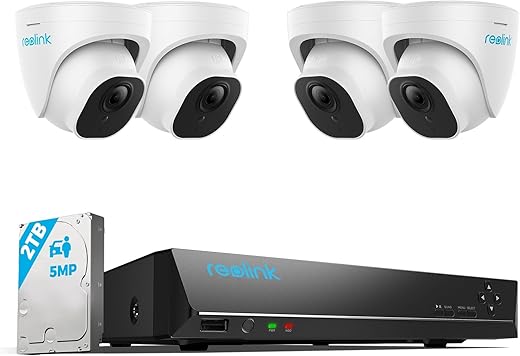
REOLINK Smart 5MP Home Security Camera System RLK8-520D4-5MP
Original price was: $419.99.$319.99Current price is: $319.99.
REOLINK Smart 5MP Home Security Camera System RLK8-520D4-5MP Price comparison
REOLINK Smart 5MP Home Security Camera System RLK8-520D4-5MP Price History
REOLINK Smart 5MP Home Security Camera System RLK8-520D4-5MP Description
REOLINK Smart 5MP Home Security Camera System RLK8-520D4-5MP: Enhanced Security at Your Fingertips
Protect your home with the REOLINK Smart 5MP Home Security Camera System RLK8-520D4-5MP. This advanced surveillance system delivers high-definition video quality, robust night vision, and user-friendly features. With a variety of recording modes and a powerful app, you can ensure your home is secure day and night. Explore how the REOLINK RLK8-520D4-5MP stands out in price comparisons and user reviews below.
Key Features and Benefits
- 5MP Video Capture Resolution: Enjoy stunning 2560 × 1920 resolution that ensures every detail is captured with clarity.
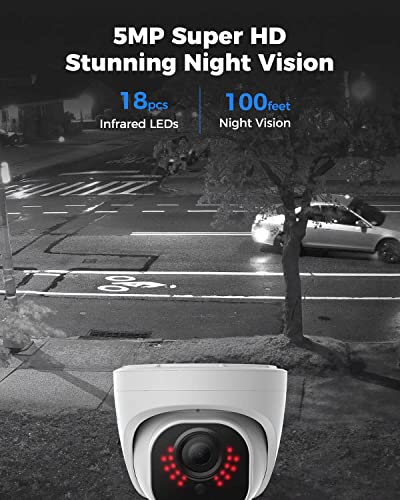
- Outstanding Night Vision: With a night vision range of up to 100ft, the REOLINK camera allows you to monitor your property even in complete darkness.
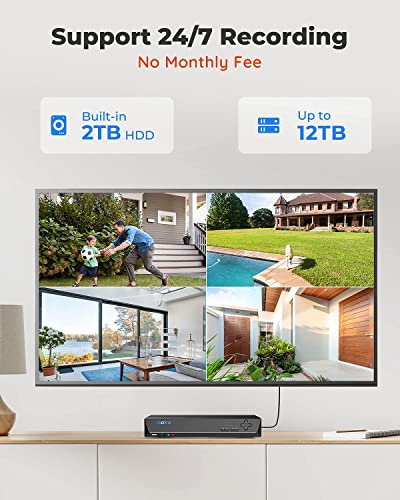
- Multiple Recording Modes: Choose from motion recording, scheduled recording, or 24/7 recording to best suit your needs.
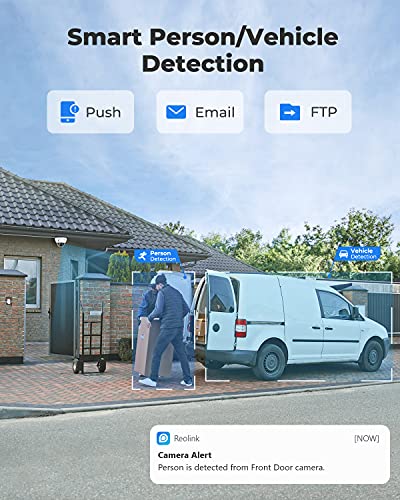
- Smart Person/Vehicle Detection: This feature minimizes false alarms, allowing you to get alerts only for genuine threats.
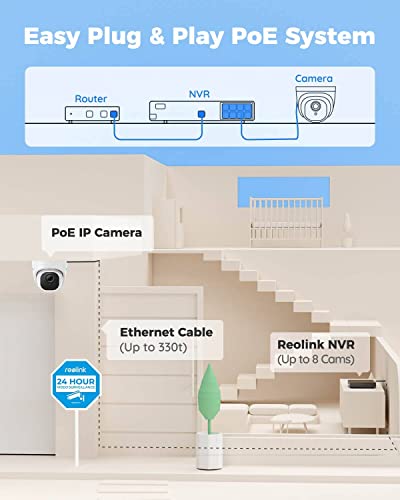
- Easy Installation: The adjustable and user-friendly design facilitates quick setup, whether for indoor or outdoor surveillance.
- App Control: Monitor your home from anywhere using the REOLINK app compatible with iOS, Android, Windows, and Mac OS.
- Waterproof Design: The IP67-rated camera can withstand various weather conditions, making it suitable for outdoor use.
- 2TB Memory Storage: With a significant storage capacity, you can store countless hours of video footage without worry.
Competitive Price Comparison
The REOLINK Smart 5MP Home Security Camera System RLK8-520D4-5MP competes favorably in terms of pricing. Across various suppliers, the prices can vary, but on average, you’ll find it ranges from $XXX to $YYY. These competitive prices make it an attractive option when you consider the advanced features and the 2TB storage included in the system.
6-Month Price History Trends
Analyzing the 6-month price history chart indicates a steady trend with minor fluctuations. The price has dipped significantly during major shopping events, providing opportunities for additional savings. Keeping an eye on these trends can help you make an informed purchase decision.
Customer Reviews Overview
Customers have consistently praised the REOLINK Smart 5MP Home Security Camera System RLK8-520D4-5MP for its exceptional image quality, easy-to-use app, and reliable night vision capabilities. Users have found the motion detection feature particularly effective, reporting a decrease in false alarms during regular use. However, some users noted that the initial setup could be slightly complicated for those unfamiliar with technology.
Notably, many reviews highlight the value for money, with many stating that the pricing aligns well with the quality and features offered. This balance solidifies the REOLINK RLK8-520D4-5MP’s reputation as a top choice among its competitors.
Explore Unboxing and Review Videos
If you’re looking for a comprehensive insight into this home security system, several YouTube channels have published unboxing and review videos. These visuals can provide additional reassurance as you see the product in action and understand its capabilities better. Users report that watching these videos helped them realize the extent of the features available with the REOLINK RLK8-520D4-5MP.
Conclusion: Secure Your Home Today
The REOLINK Smart 5MP Home Security Camera System RLK8-520D4-5MP is an exceptional choice for anyone looking to enhance their home security setup. With its high-resolution video, advanced night vision, and easy app control, it stands out in the crowded market of surveillance cameras.
Don’t miss your chance to secure your home with one of the leading security camera systems today. Compare prices now!
REOLINK Smart 5MP Home Security Camera System RLK8-520D4-5MP Specification
Specification: REOLINK Smart 5MP Home Security Camera System RLK8-520D4-5MP
|
REOLINK Smart 5MP Home Security Camera System RLK8-520D4-5MP Reviews (2)
2 reviews for REOLINK Smart 5MP Home Security Camera System RLK8-520D4-5MP
Only logged in customers who have purchased this product may leave a review.





Chris1683 –
The media could not be loaded.
UPDATED REVIEW (3/9/19):
After several e-mails to the company, Reolink has updated the firmware for the NVR and it now supports showing motion events only on the timeline with a check box. It is EXACTLY what this app needed and makes it absolutely perfect. Now it is a cinch to find the exact section of video where there was motion. They also added the ability to draw custom motion zones directly on the iPhone app. There is still no fast forward option however that does not affect the app too much. I am beyond happy with the customer service from the company and support staff. Every one of my e-mails was answered and they were true to their estimated timeline for implementing the update. I recommend this system to everyone!
ORIGINAL REVIEW:
I purchased this Reolink system to replace the Ring Video Doorbell Pro and Ring Floodlight Cam that I had installed at my home. I wanted the Reolink because unlike the Ring and its Wi-Fi competitors, the Reolink records 24/7 and offers a lot more flexibility and user customization. Before I get into the full review I would like to say that I am extremely satisfied with this unit. Unlike other reviewers, my NVR is whisper quiet and makes no sound other than the sound of the hard disk drive writing its data. I have yet to hear a fan noise of any kind.
Planning:
The most time consuming process of this system (or any wired home video system) is mapping out and installing the wires. I opted not to use the included Ethernet cables which are around 60 feet each. I purchased a spool of Cat5E from the local hardware store for around 60.00 and this proved to be more than what I needed for my installation. After my Ethernet cables were run, hooking up the cameras was quite straight forward. Plug them in, tuck in the wires and snap them to the base. Done deal.
Set Up:
After running all of my Ethernet cables to the areas where I wanted to mount the cameras, I found that everything hooked up and worked seamlessly. Once a new camera is plugged in, the NVR automatically finds it and adds it. The only configurations I had to make were for custom motion zones and my alert preferences. This system is very much plug-n-play. Because these cameras are POE (Power Over Ethernet), there are no other cables required for use other than one single Cat5 cable per camera.
Camera Quality:
The cameras are heavy duty and feel well made. Video picture quality is crystal clear and is much better than the Ring products I replaced which were only 1080P and were very dark in my opinion. The Reolink cameras have very good night vision and can light up nearly all of my rear yard (about 75 feet deep). If you have any flood lights or lights near your doors, the Reolink cameras are able to pick up light so well that you can keep them in full color mode even at night. The included cameras all record audio (you can chose to turn this off if desired) and the microphones are crisp and clear. They are quite sensitive and I could pick up my neighbors voice from around 50 feet away.
Motion alerts:
This is one of the biggest features in the age of home video recording. If I am recording video, I want to be alerted when someone is on my property or at my front door. The Reolink handles this with ease. You can set custom motion zones for every individual camera. Once the zone is set, you can customize the sensitivity and also when and how you would like alerts to be pushed to you (e-mail, push alerts, alarm on the NVR). You can also set custom time blocks where you may want more or less motion sensitivity.. Alerts are pushed instantly and on the iPhone they arrived every time without any delay.
Remote viewing from Windows, Mac & iOS:
Most people are going to be using this system for real-time alerts on their cell phone or mobile device to know if there is motion at their home. So far this system has shined in this area. The Windows and Mac client offer the full suite of customizations where you can tweak every aspect of the cameras and settings. The iOS app has many of the same features but lack a few abilities such as drawing the custom motion zones. For viewing, the iOS app works great. Upon opening the app, it immediately gives you a live stream of your cameras as well as the audio stream of whichever camera you have selected.
Playback and Recording:
This took a little time to get used to. Coming from the Ring, I was accustomed to having separate videos for every motion event or every time I pressed Live View. The drawback with Ring was that the videos were not available immediately. They had to be recorded and then uploaded to the Ring server before you could tap on it and view them. Unlike Ring, the Reolink video is a continuous timeline which gets broken down into 1-hour long segments. It is fairly simple to locate the chunk of video you want to view however unless you know the exact time you are looking for, you have to scrub through until you find what you need (I have been told this will be addressed in a future firmware update which will allow going directly to a motion event on the timeline). On the NVR itself, you can easily search by Motion Events and it breaks it down very simply for you. On the remote viewing clients, this is not the case (or at least I have not found the feature as of yet). There is no Fast Forward or Rewind so be prepared to scrub through the videos. Once you know what time you want, saving a video is very simple. On iOS, it saves directly to the camera roll and the videos are crystal clear. While live viewing any camera, you can also tap the record button to make an instant video which will save to your camera roll after you press stop. Overall, I love the ability to remotely view and save video, but I feel it could use some added features to make it better.
Conclusion:
For the money, this system meets all of my expectations and then some. While it is chocked full of features, I would really like to see the company offer the ability to fast forward and rewind while reviewing video in ALL of the remote viewing platforms. The single feature which absolutely needs to be added to iOS, Mac and Windows Clients is the ability to see any motion events in the playback timeline (again, I was advised this is in the works in a firmware update which will be released soon). This way the user can easily skip to the portion of video that is most important to them. All things considered, I recommend this system to anyone looking to get a good video surveillance system for their home.
Kyle Anwyl –
After doing a ton of research for a basic home security cam, I decided that POE (power over ethernet) security was the best for my use case for a few reasons.
My pros for using POE
1. Wanted an always-record security system without relying on pulling out the sd-card
2. Home does not have adequate wireless coverage to ensure the best video quality at all times
3. Did not want to excessively modify my home by drilling into the walls for power
My cons of using POE
1. Need a POE network switch
2. More complicated to setup than a wireless camera
Now that I was determined to get a POE camera security system, I narrowed down my research to POE only and I ended up going with REOLink NVR system because, it met all my pros of using POE, and it got rid of all my cons of using POE.
Setup and Install:
I setup two cameras in the front, one covering the driveway/garage and the other covering the front entrance/front door. The other two camera are covering the backyard. The included 4 cameras are enough to record about 90 percent around the house, with some dead spots where I purposely avoided recording any of my neighbors. The included kit was great and all the pieces are there. I did purchase my own ethernet cables because I wanted longer cables that were easily hidden. I went with 100 feet flat cabling. Each camera ethernet cable goes up to my roof and into an attic vent then down to a hallway, into the NVR controller. This way, I only drilled a single hole from the attic to the hallway right along the wall so almost nothing is visible.
I initially used a monitor hooked up to the NVR to set it up but once the initial settings were configured, I disconnected everything except the power and ethernet and control the NVR completely from my PC. Once I figured that out, I moved the entire NVR box into the attic and only have the ethernet from the NVR come through the hole and into my router.
I would say the most difficult part of the install was going up to the roof of the house and routing all the ethernet cables, clip them in place, and hide them by snaking them along my roof tiles. That part took a few hours. Once all the ethernet wiring was done, the camera install was easy, taking only 5 to 10 minutes per camera.
Video Quality:
The 2k video quality was the best compromise for the price and picture quality. I wanted to make sure I can clearly see faces at least up to 20 feet away. The included RLC-520 does an outstanding job in the day and ok job during the night. The day quality is great, I can see faces much further than 20 feet and recorded video is clear enough to zoom pretty far. The night quality is ok, it’s about what I expected for the price. It still shows good detail just not clearly able to distinguish faces at 20 feet. I have my settings at 2560×1920@30fps with 8192 bitrate, sound on, no motion detection. With 4 cameras, I fill the 2TB hard drive in about a week and then it overwrites the oldest video, like how a dash cam works. In the future, I might try to upgrade the capacity.
Reolink App:
I use the windows client on my home PC and it’s very easy and intuitive to use. Every aspect of the system can be controlled and monitored with the client and I like how easy it is to organize all the video, taking a pic, video clipping, zooming, all very easy and intuitive. Not sure what video settings to use so I just maxed them all out. I also use the android client when not home and it works just as well and has all the configuration options like the windows client. Overall I would say the client exceeded my expectations for the price.
Reolink Support:
Amazing support! I had an issue with one camera reverting to default settings and I contacted support. They asked me a few questions and then immediately sent a replacement camera. Unfortunately, the camera was delayed because it was out of stock but I didn’t mind, the camera was still recording fine, just not at the maxed-out settings I always set it to. Reolink support was responsive and communicative and I have faith they will take care of me in the future.
Conclusion:
For the price I paid, I love this kit. It perfectly ticked off every checkmark I had as a requirement. Now I have peace of mind, I didn’t drill all over my house, the camera always records so I can playback, the video quality is good, and the interface is so easy to use, my kids even use it on their phone.